
Facebook Ads
Renta allows you to sync data from your Facebook Ads account directly to your data warehouse, automating the process of moving marketing data to your analytics stack.
Authentication
Renta uses OAuth authentication to connect securely to your Facebook Ads account. This method ensures that your credentials are not shared directly with Renta while providing the necessary limited access.
Connect Facebook Ads source
Follow these steps to add Facebook Ads as a source in Renta using OAuth authentication.
Navigate to the Connections > Catalog section in the left sidebar.


Find and select Facebook Ads under the Advertising category.


Click the Log in to your Facebook Ads account button. This will redirect you to Facebook for OAuth login.


Review the requested permissions to allow Renta access to your account and click Reconnect (or Continue).


Fill in the connection details:
- Source name.
Specify the name of the data source. This is used exclusively in the Renta interface.
Click Save to finish the setup. Your new source will now appear in the sources list.


Pipeline configuration
When creating a pipeline with the Facebook Ads source, you will need to configure the following settings:


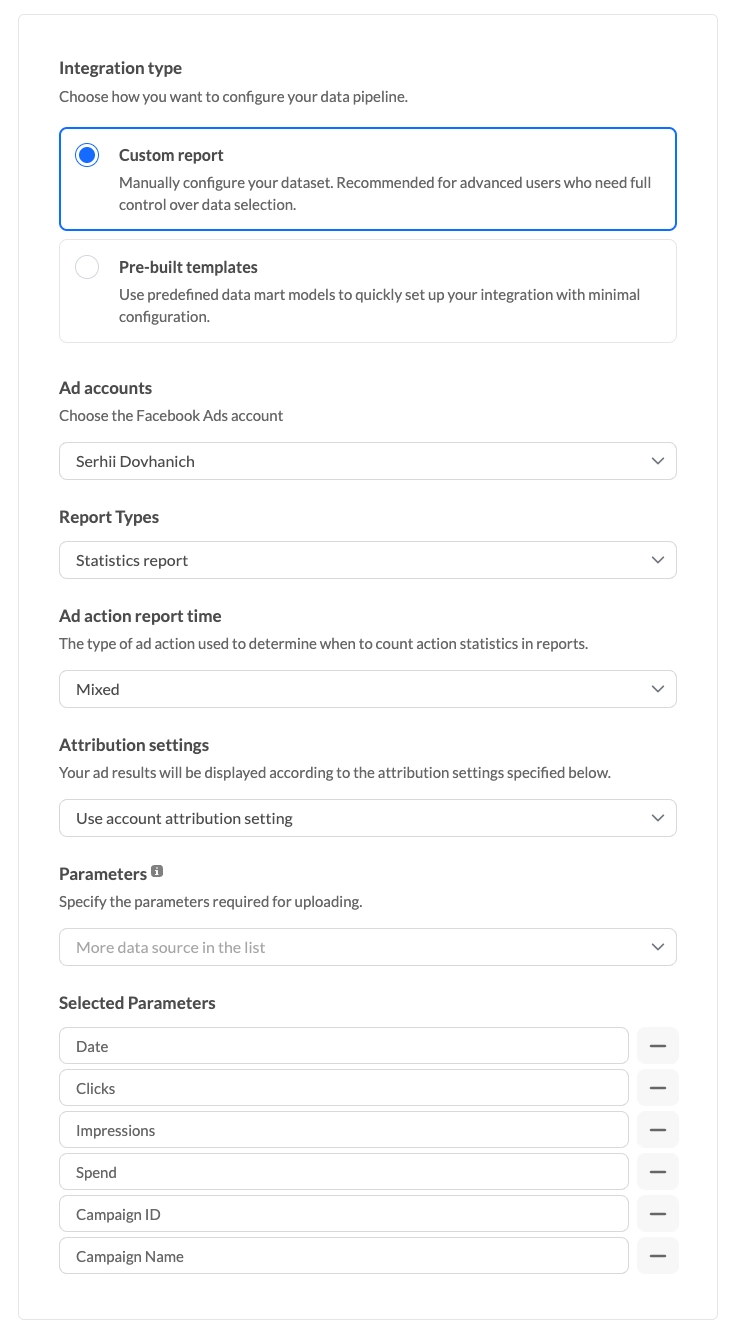
Integration type
Choose how you want to configure your data pipeline.
| Type | Description |
|---|---|
| Custom report | Manually configure your dataset. Recommended for advanced users who need full control over data selection. |
| Pre-built templates | Use predefined data mart models to quickly set up your integration with minimal configuration. |
Ad accounts
Select the advertising accounts you want to include as data sources for this synchronization process.
Choose the Facebook Ads accounts to extract data from. You can select multiple accounts.
Report types
The following table summarizes the different report types available for extraction from Facebook Ads.
Choose the type of report you want to extract.
| Report Type | Description |
|---|---|
| Statistics report | Statistics for standard and custom conversions with breakdown details across campaign, ad group, and ad levels. Includes metrics like impressions, clicks, spend, reach, etc. |
| Campaign metadata | Includes fields summarizing settings like status, daily budgets, cost per result, and schedules. Contains only structural data. |
| Ad group metadata | Details about your ad sets including targeting options, budget configurations, and optimization goals. Contains only structural data. |
| Ad metadata | Specifics about the ads themselves, such as creative IDs, status, and related campaign or ad set associations. Contains only structural data. |
| Ad account metadata | High-level settings for the ad account, covering aspects like currency, timezone, spending limits, and business information. Contains only structural data. |
Ad action report time
(Only for Statistics report). The type of ad action used to determine when to count action statistics in reports.
| Value | Description |
|---|---|
| Mixed | Uses Facebook's model combining impression and click. |
| Impression | Conversion is counted based on ad view. |
| Conversion | Conversion is counted when the action occurs. |
| Lifetime | Accounts for all actions over the lifetime. |
Attribution settings
(Only for Statistics report). Your ad results will be displayed according to the attribution settings specified.
| Setting | Description |
|---|---|
| Use account attribution setting | Uses the attribution settings configured in your Facebook ad account. |
| Use unified attribution setting | Uses Facebook's unified attribution model. |
Parameters
In this section, you can specify the metrics and dimensions that Renta will sync to your data warehouse destination.
Include fields like Date, Clicks, Impressions, Spend, and various IDs to build your analytical reports.
Dynamic link parsing
Renta automatically parses UTM tags from templates or direct ad URLs. The following dynamic parameters are supported during link parsing:
| URL Placeholder | Data Field | Description |
|---|---|---|
| ad.id | ad_id | Unique identifier for the advertisement |
| ad.name | ad_name | The name of the advertisement |
| adset.id | adset_id | Unique identifier for the ad set |
| adset.name | adset_name | The name of the ad set |
| campaign.id | campaign_name | Campaign ID (currently mapped to campaign_name) |
| campaign.name | campaign_name | The name of the advertising campaign |
These placeholders are substituted into standard UTM parameters: utm_medium, utm_source, utm_campaign, utm_content, and utm_term.
Example usage in an ad URL:
https://example.com/landing?utm_source=facebook&utm_campaign={{campaign.name}}&utm_content={{ad.name}}In the statistics report, these placeholders are automatically replaced with the actual values for each ad.
Date Range
Specify the historical period for which you want to retrieve data from your Facebook Ads account.
Renta allows you to extract historical data for any chosen timeframe without limitations.
Overwrite period
The overwrite window configuration ensures that your data remains consistent by updating changed historical records.
Choose the period of time which will be overwritten. Every day the data for that period will be deleted and inserted again, ensuring data consistency and addressing late-arriving conversions.
Sync scheduling
Renta provides several options for automating your data pipelines and keeping your reports up to date.
Sync strategy
The platform employs different synchronization methods depending on the nature of the data being extracted.
The following table describes the synchronization strategies used by Renta for Facebook Ads:
| Strategy | Description |
|---|---|
| Incremental load | Renta will continuously synchronize your data incrementally as long as the Date field is selected in your parameters.Supported reports: Statistics report with Date selected. |
| Full overwrite | Renta reloads the entire dataset during each sync since these reports represent configuration snapshots without temporal properties like dates, or lack a date parameter entirely. Supported reports: Campaign metadata, Ad group metadata, Ad metadata, Ad account metadata, and Statistics report when Date is not selected. |
Ready to get started?
Build your data pipeline today or get a personalized demo. Start free!
Need help?
Get expert support to ensure your project succeeds. We're here to help!
Feature requests?
Help shape our product! Share your ideas for new features and integrations.