
Snowflake destination
Learn how to connect your Snowflake data warehouse as a destination in Renta ELT.
Prerequisites
Before you begin, ensure you have:
- Snowflake account.
A Snowflake account with administrative privileges to run setup scripts. - Renta ELT account.
Access to the Renta ELT platform with permissions to configure destinations
Choose the Snowflake warehouse strategy
You can choose to create an exclusive warehouse for Renta ELT or use an existing warehouse:
| Warehouse strategy | Description |
|---|---|
| Exclusive warehouse for Renta ELT | Create a dedicated warehouse for Renta ELT operations. This ensures that ETL operations will never contend with your analytical queries for compute resources. You will incur the cost of running this separate warehouse. |
| Shared warehouse | Use an existing warehouse to reduce infrastructure costs. Renta ELT loads data incrementally and consumes minimal compute resources. However, ETL operations may occasionally contend with your other workloads for shared resources during high-traffic periods. |
Run the setup script in Snowflake
Before connecting Snowflake to Renta ELT, you need to create a dedicated service account and an associated role. This account will be used exclusively by the Renta ELT platform to connect to your database. Additionally, you will need to grant this role the appropriate permissions to read data and create the necessary schemas and tables.
Configuring the Snowflake environment
Follow these steps to create the service account, allocate compute resources, and configure permissions using our automated SQL script.
Log in to your Snowflake console using an account with ACCOUNTADMIN privileges. Navigate to the Worksheets tab and create a new SQL worksheet.
The setup script relies on configuration variables at the very beginning to simplify the setup process and ensure it matches your organization's naming conventions. Take a moment to define your own values or use the pre-configured ones. Be sure to replace the TempP@ssw0rd123 value with a robust password.
Copy the complete SQL script below and paste it into your worksheet. Ensure you run the script in a single execution or within the same session. Running it sequentially guarantees that the configuration variables defined at the beginning are correctly applied to subsequent commands in the script.
-- =====
-- Configuration variables
-- =====

SET role_name       = 'RENTA_ROLE';
SET user_name       = 'RENTA_USER';
SET user_password   = 'TempP@ssw0rd123';    -- IMPORTANT: Change before execution
SET warehouse_name  = 'RENTA_WAREHOUSE';
SET database_name   = 'RENTA_DATABASE';
SET schema_name     = 'RENTA';

-- =====
-- Role and user creation
-- =====

USE ROLE securityadmin;

-- Create Renta ELT role
CREATE ROLE IF NOT EXISTS IDENTIFIER($role_name)
  COMMENT = 'Role for Renta ELT service operations';

-- Grant role to SYSADMIN for role hierarchy
GRANT ROLE IDENTIFIER($role_name) TO ROLE SYSADMIN;

-- Create Renta ELT service user
CREATE USER IF NOT EXISTS IDENTIFIER($user_name)
  PASSWORD = $user_password
  DEFAULT_ROLE = $role_name
  DEFAULT_WAREHOUSE = $warehouse_name
  MUST_CHANGE_PASSWORD = FALSE
  COMMENT = 'Service account for Renta ELT operations';

-- Assign role to user
GRANT ROLE IDENTIFIER($role_name) TO USER IDENTIFIER($user_name);

-- =====
-- Virtual warehouse creation
-- =====

USE ROLE sysadmin;

CREATE WAREHOUSE IF NOT EXISTS IDENTIFIER($warehouse_name)
  WITH
    WAREHOUSE_SIZE = 'XSMALL'           -- Adjust size based on workload requirements
    AUTO_SUSPEND = 300                  -- Auto-suspend after 5 minutes of inactivity
    AUTO_RESUME = TRUE                  -- Auto-resume on query submission
    INITIALLY_SUSPENDED = TRUE          -- Start in suspended state
    COMMENT = 'Dedicated warehouse for Renta ELT operations';

-- Grant warehouse privileges to Renta role
GRANT USAGE ON WAREHOUSE IDENTIFIER($warehouse_name) TO ROLE IDENTIFIER($role_name);
GRANT OPERATE ON WAREHOUSE IDENTIFIER($warehouse_name) TO ROLE IDENTIFIER($role_name);

-- =====
-- Database and schema creation
-- =====

-- Switch to ACCOUNTADMIN for database creation
USE ROLE accountadmin;

-- Create Renta database
CREATE DATABASE IF NOT EXISTS IDENTIFIER($database_name)
  COMMENT = 'Database for Renta ELT data and transformations';

-- Transfer ownership to SYSADMIN for operational management
GRANT OWNERSHIP ON DATABASE IDENTIFIER($database_name) TO ROLE sysadmin COPY CURRENT GRANTS;

-- Switch back to SYSADMIN
USE ROLE sysadmin;

-- Set database context
SET use_db_stmt = 'USE DATABASE ' || $database_name;
EXECUTE IMMEDIATE $use_db_stmt;

-- Create main schema
CREATE SCHEMA IF NOT EXISTS IDENTIFIER($schema_name)
  COMMENT = 'Main schema for Renta ELT tables and views';

-- =====
-- Permission grants
-- =====

-- Database-level permissions
GRANT USAGE ON DATABASE IDENTIFIER($database_name) TO ROLE IDENTIFIER($role_name);
GRANT CREATE SCHEMA ON DATABASE IDENTIFIER($database_name) TO ROLE IDENTIFIER($role_name);

-- Schema-level permissions for object creation
GRANT USAGE ON SCHEMA IDENTIFIER($schema_name) TO ROLE IDENTIFIER($role_name);
GRANT CREATE TABLE ON SCHEMA IDENTIFIER($schema_name) TO ROLE IDENTIFIER($role_name);
GRANT CREATE VIEW ON SCHEMA IDENTIFIER($schema_name) TO ROLE IDENTIFIER($role_name);
GRANT CREATE STAGE ON SCHEMA IDENTIFIER($schema_name) TO ROLE IDENTIFIER($role_name);
GRANT CREATE FILE FORMAT ON SCHEMA IDENTIFIER($schema_name) TO ROLE IDENTIFIER($role_name);
GRANT CREATE SEQUENCE ON SCHEMA IDENTIFIER($schema_name) TO ROLE IDENTIFIER($role_name);
GRANT CREATE FUNCTION ON SCHEMA IDENTIFIER($schema_name) TO ROLE IDENTIFIER($role_name);
GRANT CREATE PROCEDURE ON SCHEMA IDENTIFIER($schema_name) TO ROLE IDENTIFIER($role_name);
GRANT CREATE PIPE ON SCHEMA IDENTIFIER($schema_name) TO ROLE IDENTIFIER($role_name);
GRANT CREATE STREAM ON SCHEMA IDENTIFIER($schema_name) TO ROLE IDENTIFIER($role_name);
GRANT CREATE TASK ON SCHEMA IDENTIFIER($schema_name) TO ROLE IDENTIFIER($role_name);

-- Permissions on all existing tables in schema
GRANT SELECT, INSERT, UPDATE, DELETE ON ALL TABLES IN SCHEMA IDENTIFIER($schema_name)
  TO ROLE IDENTIFIER($role_name);

-- Permissions on all existing views in schema
GRANT SELECT ON ALL VIEWS IN SCHEMA IDENTIFIER($schema_name)
  TO ROLE IDENTIFIER($role_name);

-- Permissions on future tables (automatically apply to new tables)
GRANT SELECT, INSERT, UPDATE, DELETE ON FUTURE TABLES IN SCHEMA IDENTIFIER($schema_name)
  TO ROLE IDENTIFIER($role_name);

-- Permissions on future views (automatically apply to new views)
GRANT SELECT ON FUTURE VIEWS IN SCHEMA IDENTIFIER($schema_name)
  TO ROLE IDENTIFIER($role_name);

-- =====
-- Verification
-- =====

-- Display created objects
SHOW ROLES LIKE 'RENTA_ROLE';
SHOW USERS LIKE 'RENTA_USER';
SHOW WAREHOUSES LIKE 'RENTA_WAREHOUSE';
SHOW DATABASES LIKE 'RENTA_DATABASE';

-- Display granted permissions
SHOW GRANTS TO ROLE IDENTIFIER($role_name);

-- Verify schema exists
SHOW SCHEMAS IN DATABASE IDENTIFIER($database_name);
Adding Snowflake as a Destination
In this section, we'll show how to add Snowflake as a Destination in Renta ELT.
Log in to your Renta ELT platform and navigate to Destination in the left sidebar.


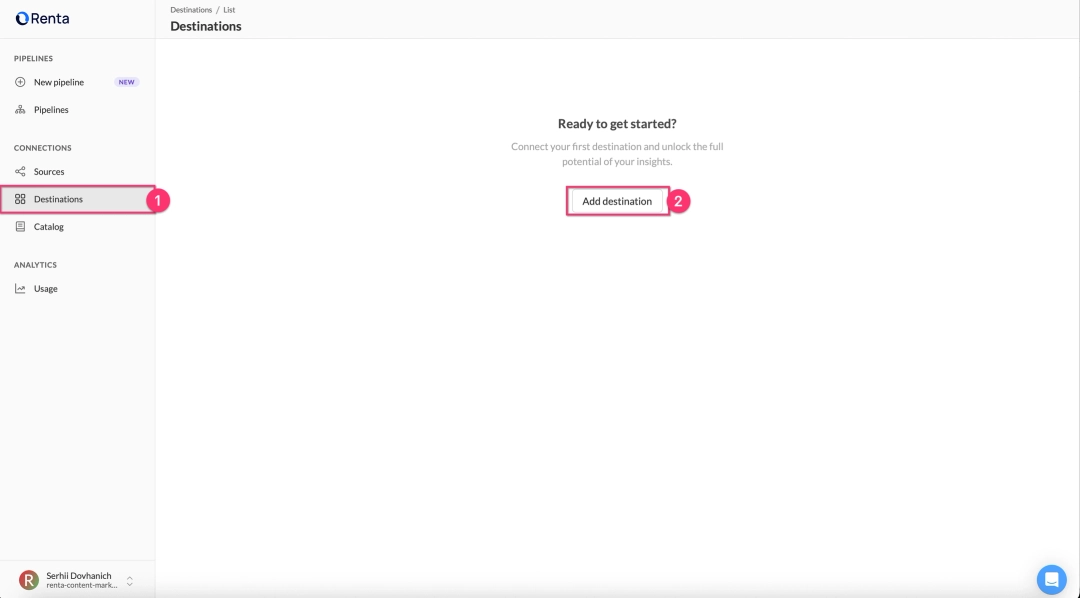
Click the Add Destination button in the top right corner.


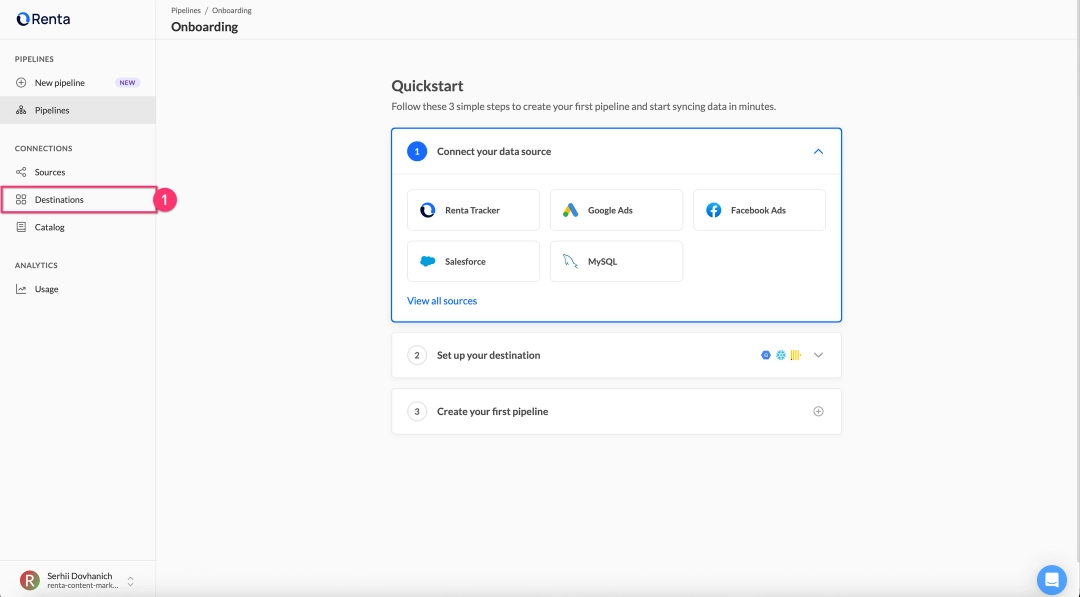
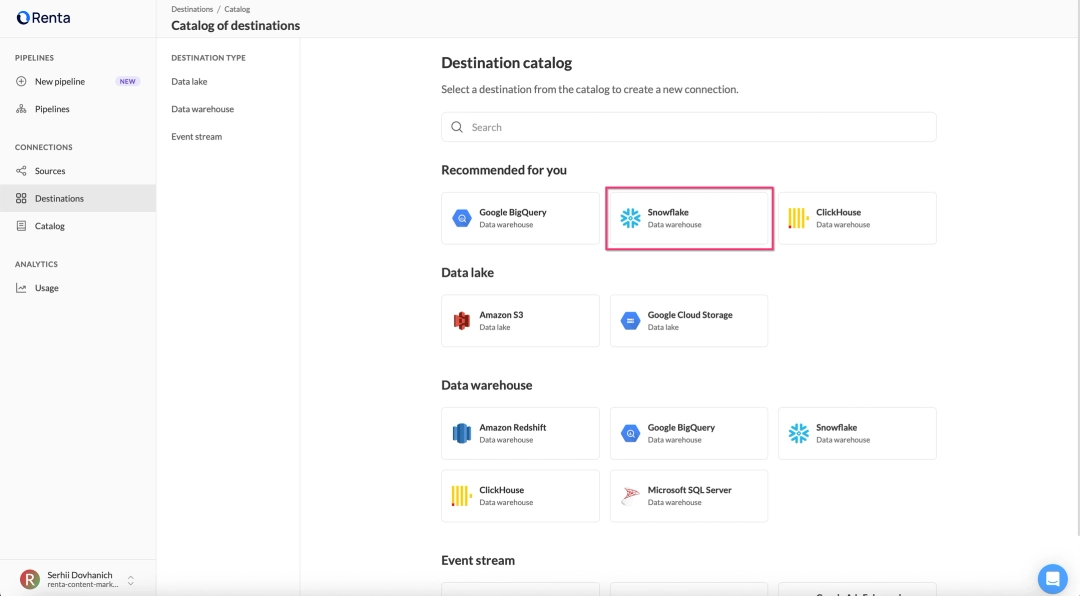
Select Snowflake from the list of available destination types.


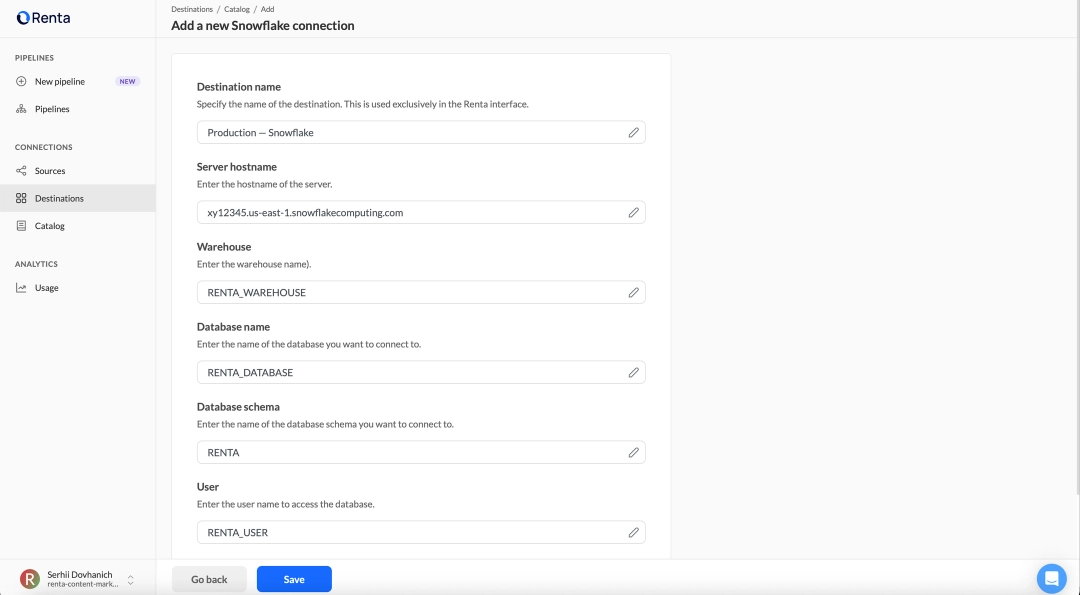
Fill in the connection details form:
| Field | Field description |
|---|---|
| Destination name | A descriptive name for this destination. Example: Production — Snowflake |
| Server hostname | Your Snowflake account URL. Example: https://xy12345.us-east-1.snowflakecomputing.com |
| Warehouse | The warehouse you created in the setup script. Example: RENTA_WAREHOUSE |
| Database name | The database name from the setup script. Example: RENTA_DATABASE |
| Database schema | The schema name from the setup script. Example: RENTA |
| User | The username you created in the setup script. Example: RENTA_USER |
| Password | The password you set in the setup script. Example: TempP@ssw0rd123 |
Click Save to verify that Renta ELT can successfully connect to your Snowflake warehouse.


Ready to get started?
Build your data pipeline today or get a personalized demo. Start free!
Need help?
Get expert support to ensure your project succeeds. We're here to help!
Feature requests?
Help shape our product! Share your ideas for new features and integrations.